Necessary tools
In order to be able to install firmware, the following tools are required:
- Personal computer with MS Windows
- Network cable to connect the Valuejet wit the pc
- The latest MSA-tool (Mutoh Service Assistance) or MSM-tool (Mutoh Status Monitor)
Detailed instructions how to install the firmware, are described in the maintenance manual.
The latest current firmware can be downloaded on the link here below this article.
Release date: 03 february 2021
Current version - 1.10
Bugfix
- While "[*] Check Clr. -> E"is displayed on the panel and the cartridge is removed and reinserted, none of the following didn't work:
- Media feed
- Nozzle check print
- Print head cleaning
This is issue has been fixed.
Version history
Release date: 02 september 2020
1.09
Changed items
- Implementation of a new feature to handle smart-chip related issues, with the new S/C Recovery procedure.
For more information check the following article: TIB818 - Smart Chip Recovery - The "Ink End" detection, software-handling and ink-consumption have been improved.
- When the diameter input is set to 27mm in rotary mode, the UV unit collides with the rotary unit. Changed the minimum input value of diameter to 29mm
- When receiving a remote command for nozzle check during media detection, the display shows that analysis is in progress, but nothing responds. This has been fixed
- When printing the nozzle check remotely the time and date weren't printed correctly. This has been fixed
- E074 error occurred when the carriage was moved manually. This could occur when the printer is in sleep mode and cartridges were replaced (removed/inserted). This has been fixed.
- Added support for UH21 ink cartridges
Release date: 17 february 2020
1.08
This firmware version will update / adapt certain internal code structures.
Release date: 9 december 2019
1.07
Changed items
Color maintenance menu has been added in user mode (only when using US11 ink)
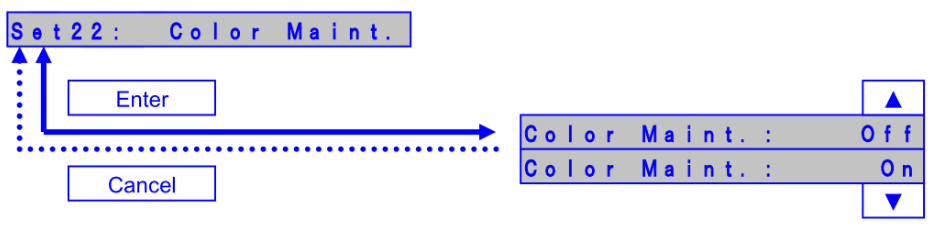
Color Maint. : On
The printer performs color ink maintenance when waking up after 72 hours of sleep mode to ensure smooth startup after longer sleep times.
Color Maint. : Off
The printer does not perform the color ink maintenance
Diagnostics
A new parameter-setting has been introduced since firmware version 1.06 (or higher):
Diagnostics >> Parameter >> Update >> Table Shaft
There are 2 possible combinations:
| Parameter setting: | Paramter >> Update >> Table >> Shaft A | Paramter >> Update >> Table >> Shaft B |
| To be used in the following sitation: | When the original shaft is being used (former part number DG-48154) | When Technical Bulletin TIB816 has been applied and the table shaft is upgraded with part number DF-30519. |
Release date: 11 december 2018
1.05
Changed items
Changed the lifetime counting method for suction pump
=> The lifetime of suction pump is changed from 285 hours to 17,100 counts (equivalent to 5 hours).

Bug correction
Fix the bug that it takes time to complete a print job if using Mac OS High Sierra.
Remark
When you install this F/W, please use MSA ver. 4.1.5.0 or higher
Release date: 10 october 2018
1.04
New Items
- Changed UV lamp operation during printing
UV irradiation area is changed from Media width to Print width.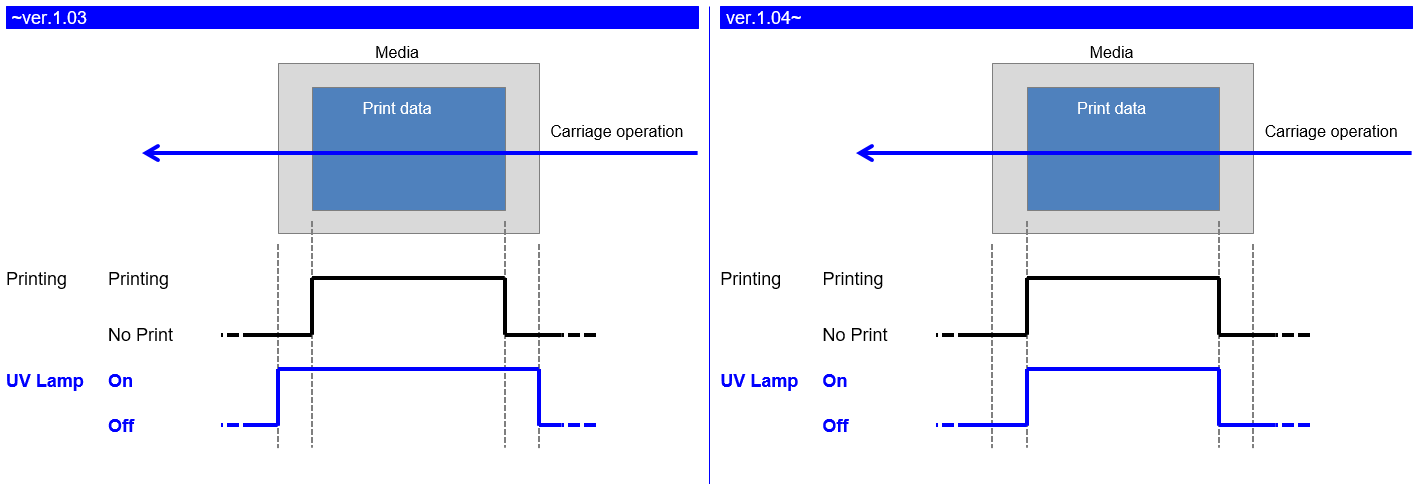
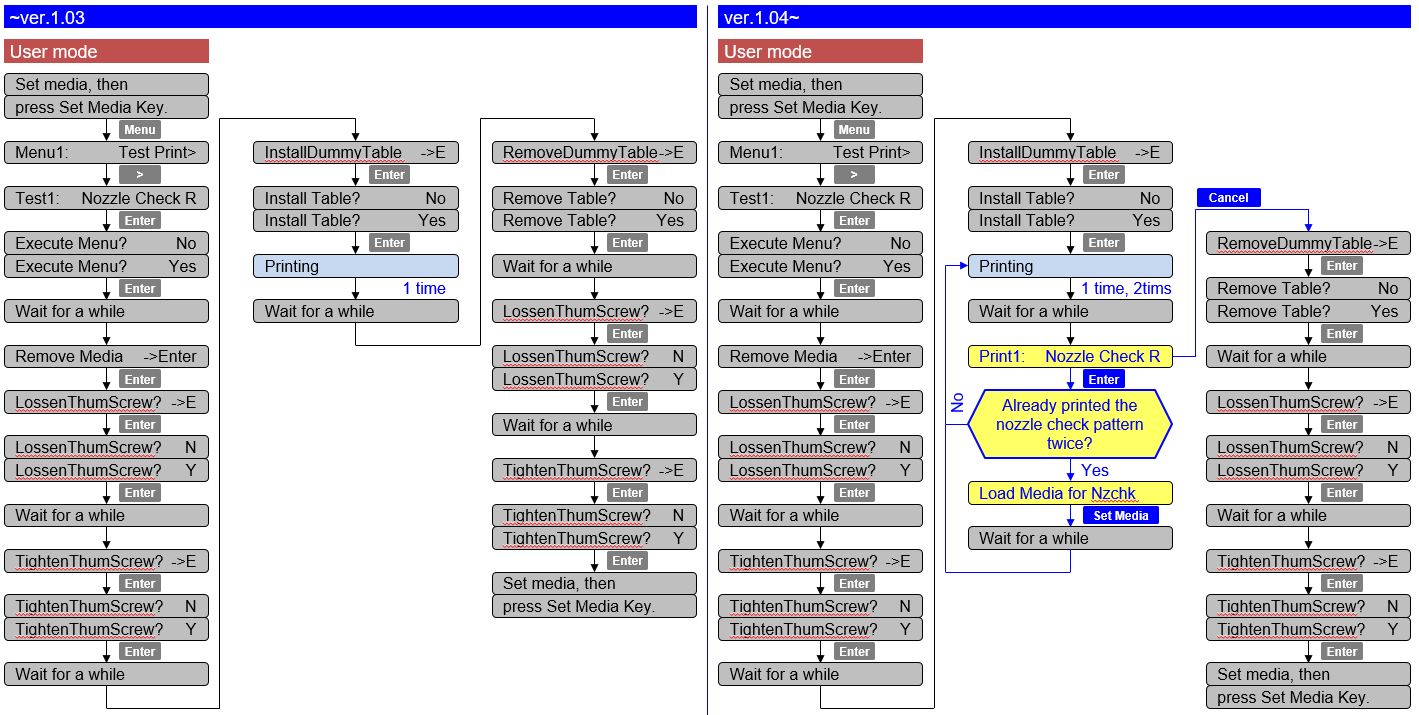
Print the printer information on the nozzle check pattern [User mode]
Printer info.: Print time, S/N, F/W Version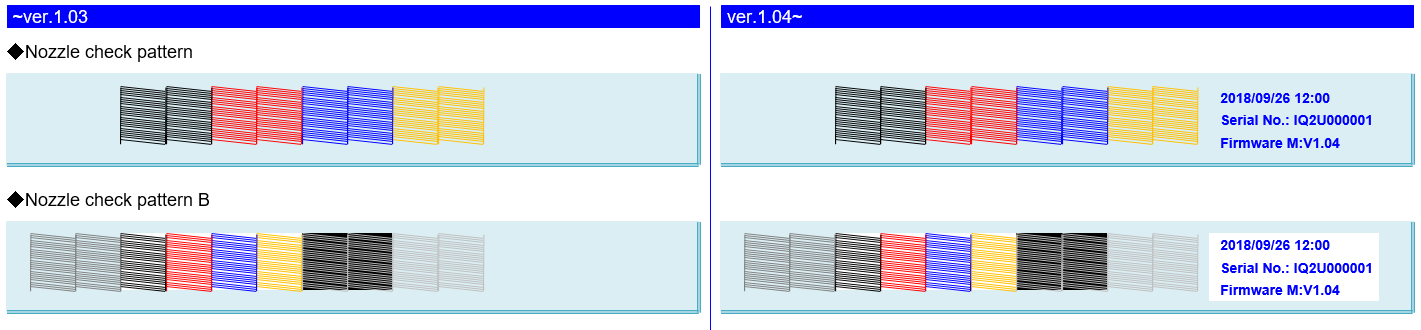
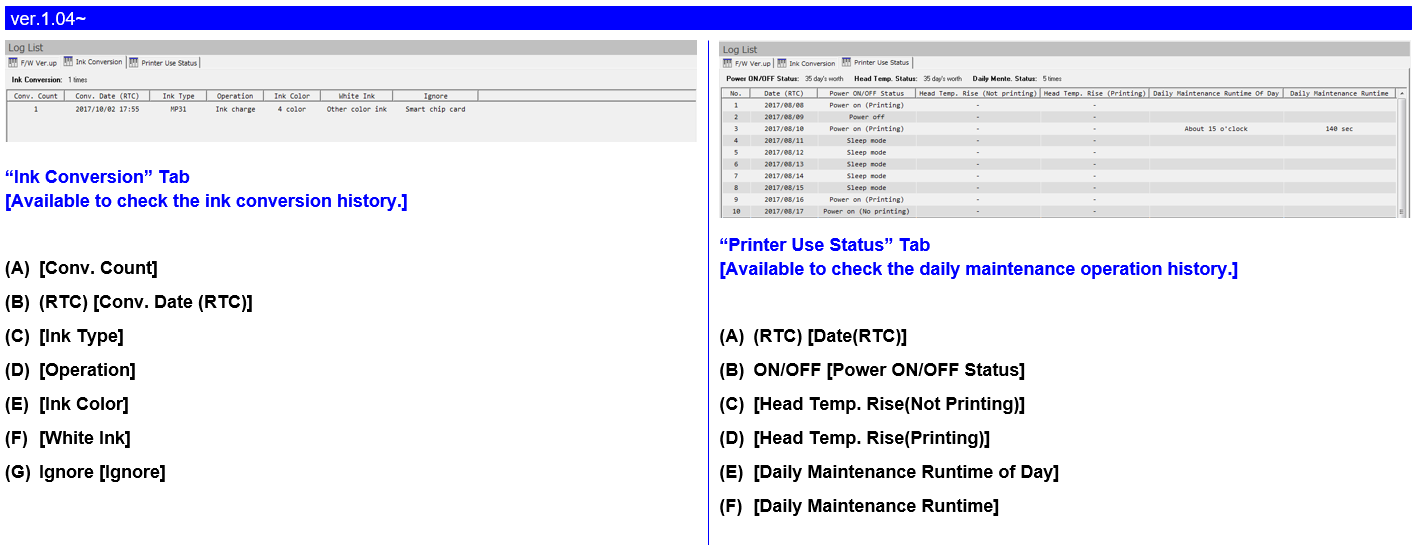
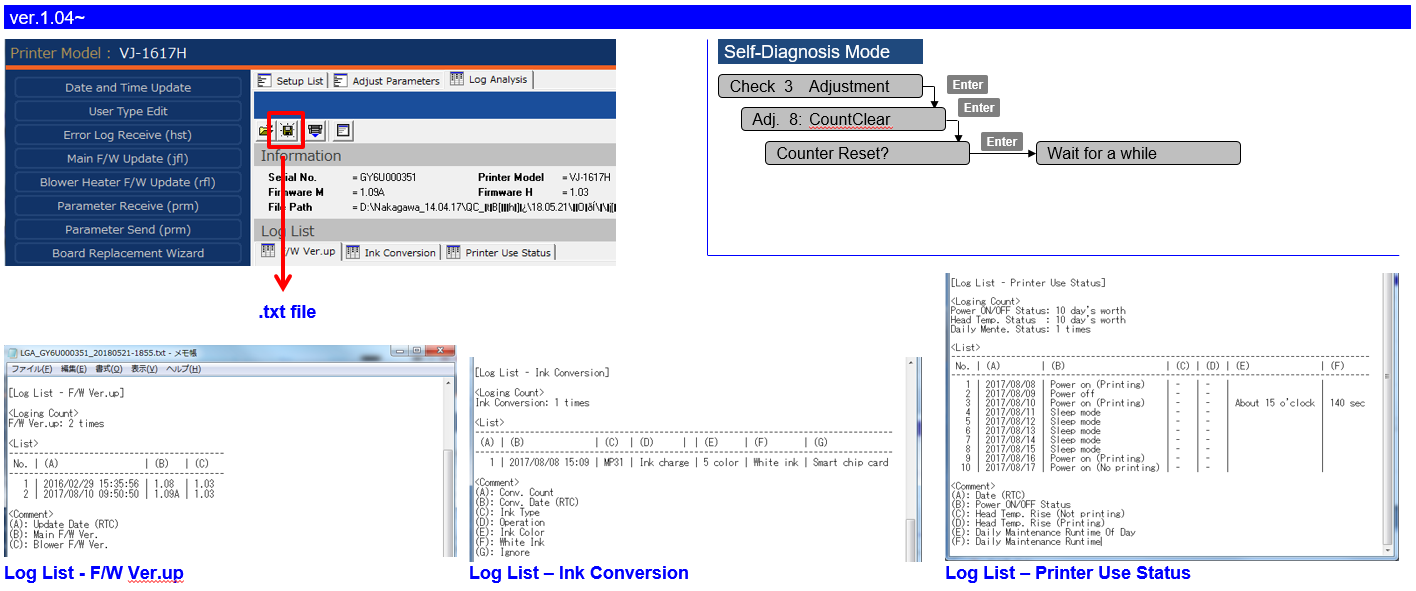
Added the function to save the history of daily maintenance log
The history can be checked with MSA ver.4.1.7.0 or later.
(Cannot be checked on the operation panel)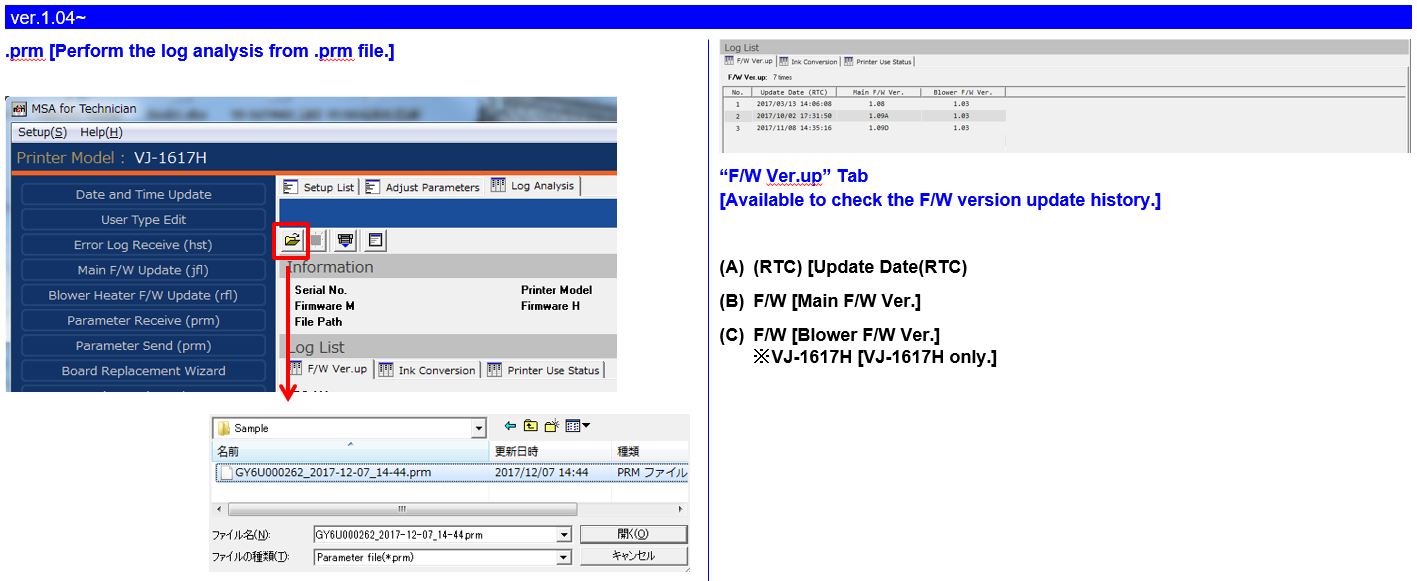
Changed the printer operation during the daily maintenance [User mode (Rotary Mode)]
If the table is lower than the maintenance position, the table up/down operation is skipped.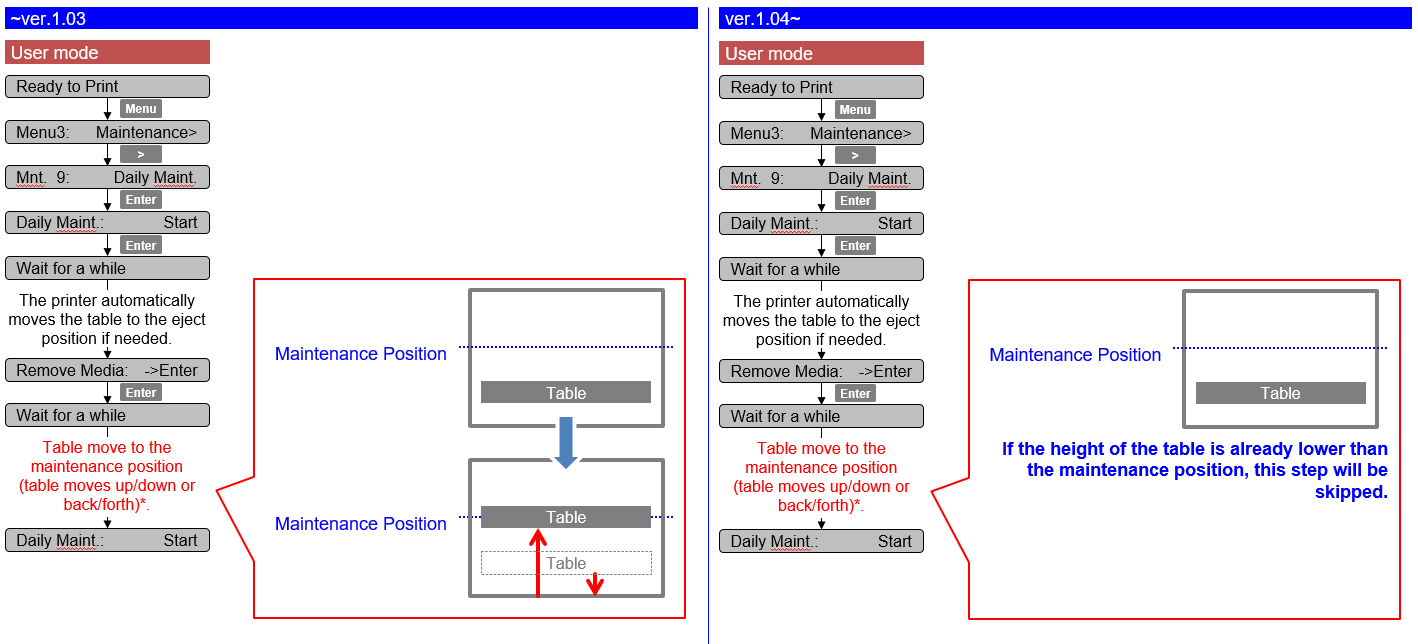
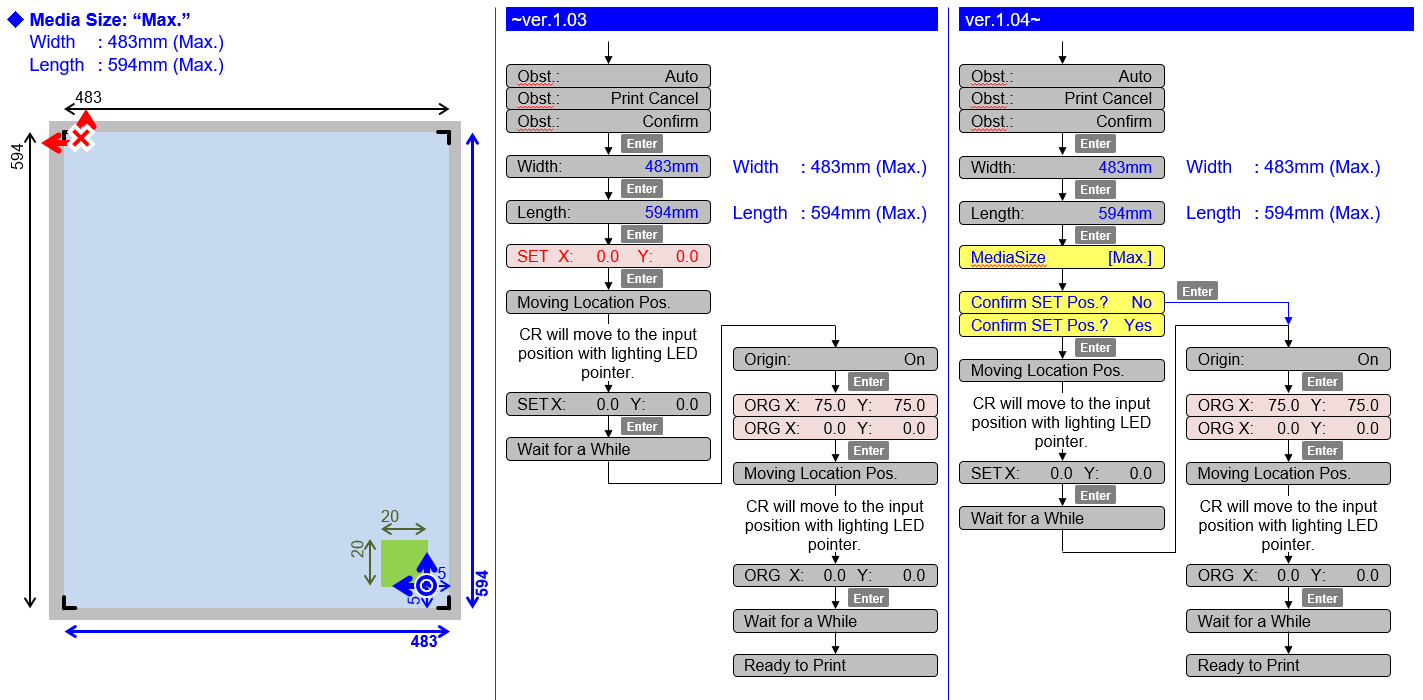
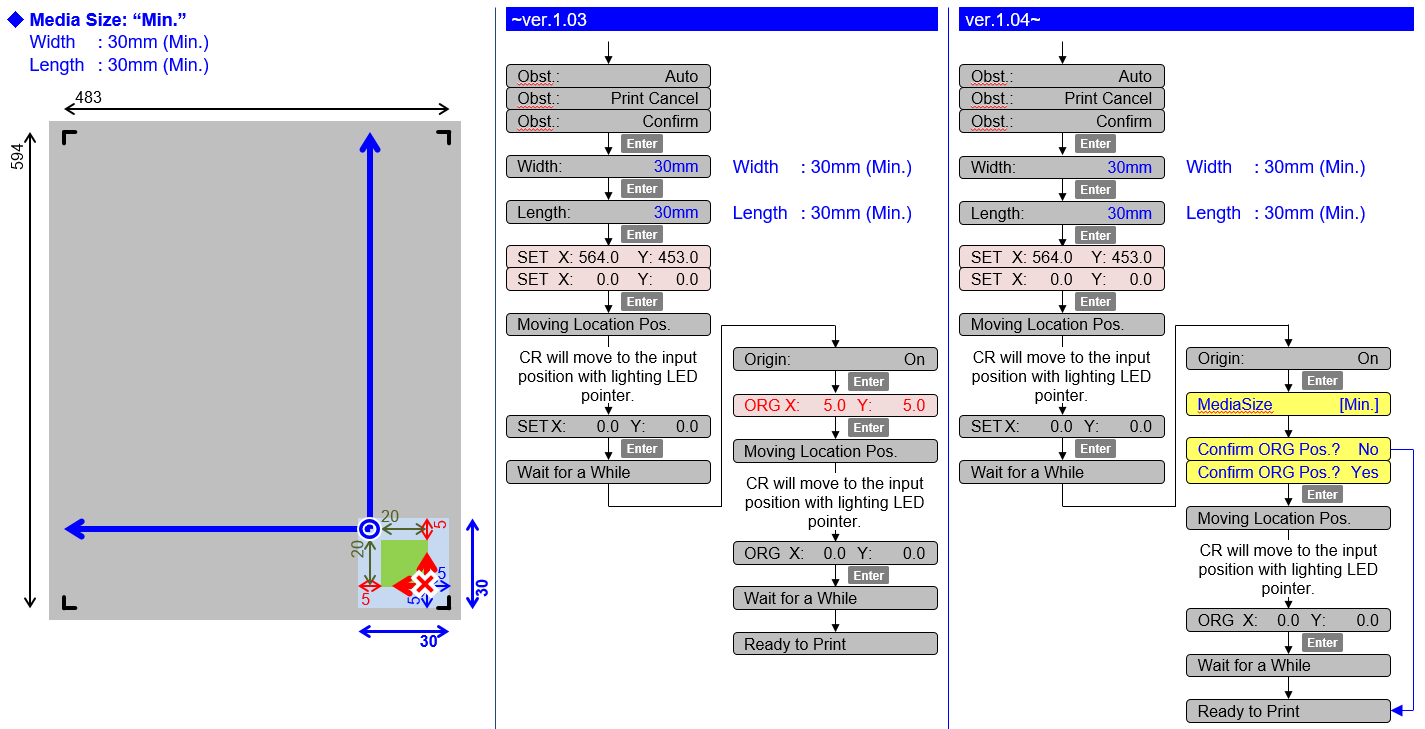
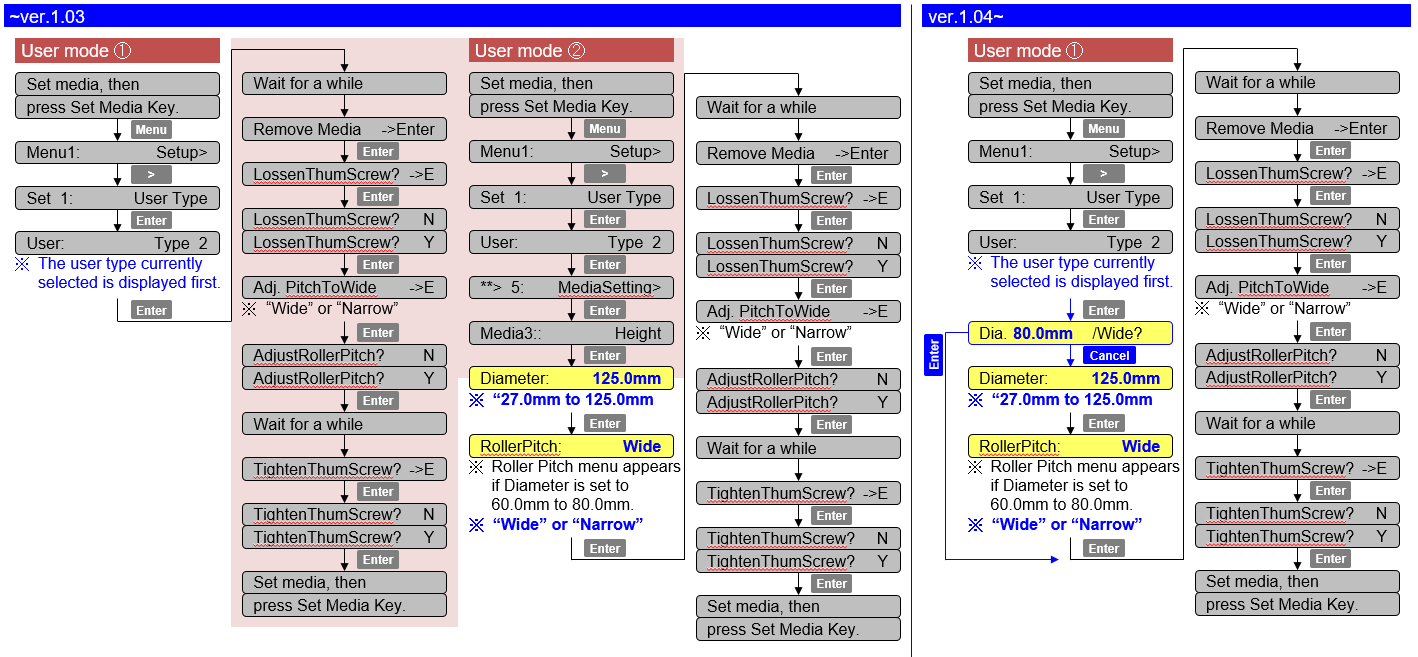
Added skip function to the Media setting menu [User mode]
Some steps can be skipped if the media size is set to maximum or minimum.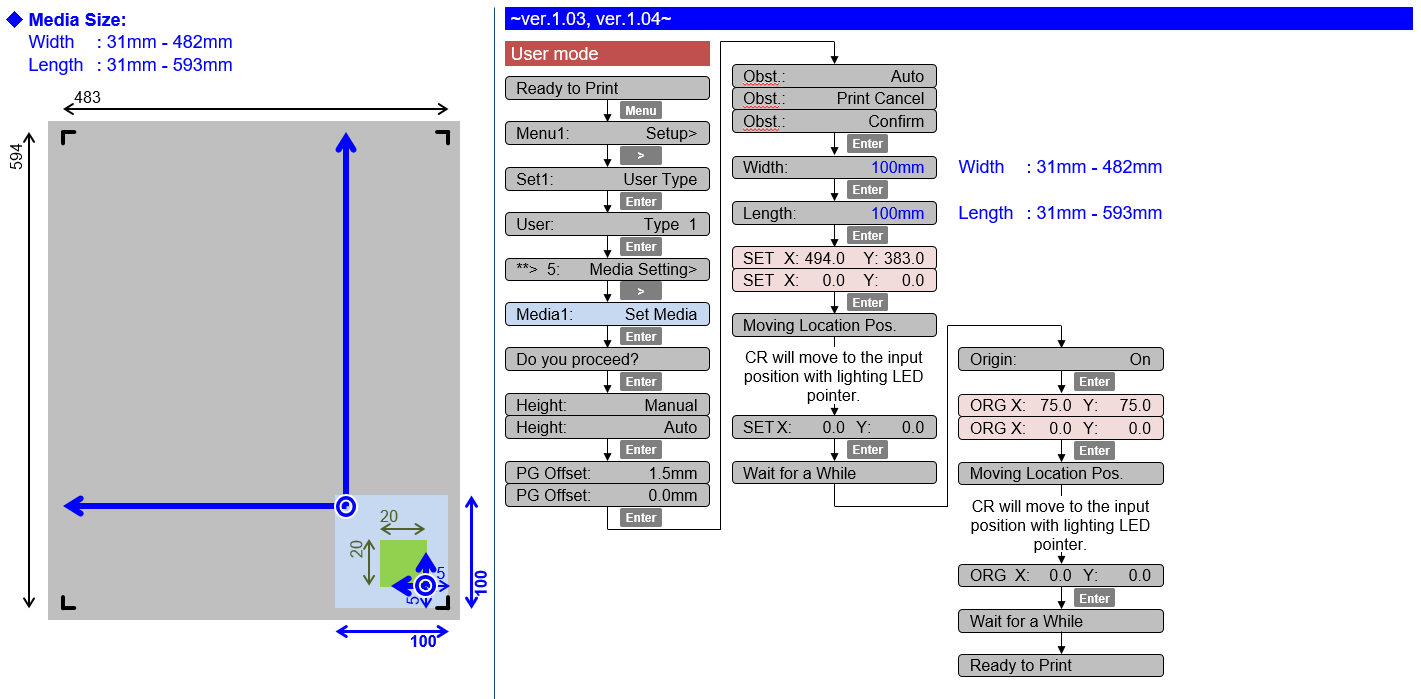
Added a cancel function to the rotary unit installation [User mode]
The printer can cancel the rotary unit installation even after executing the menu.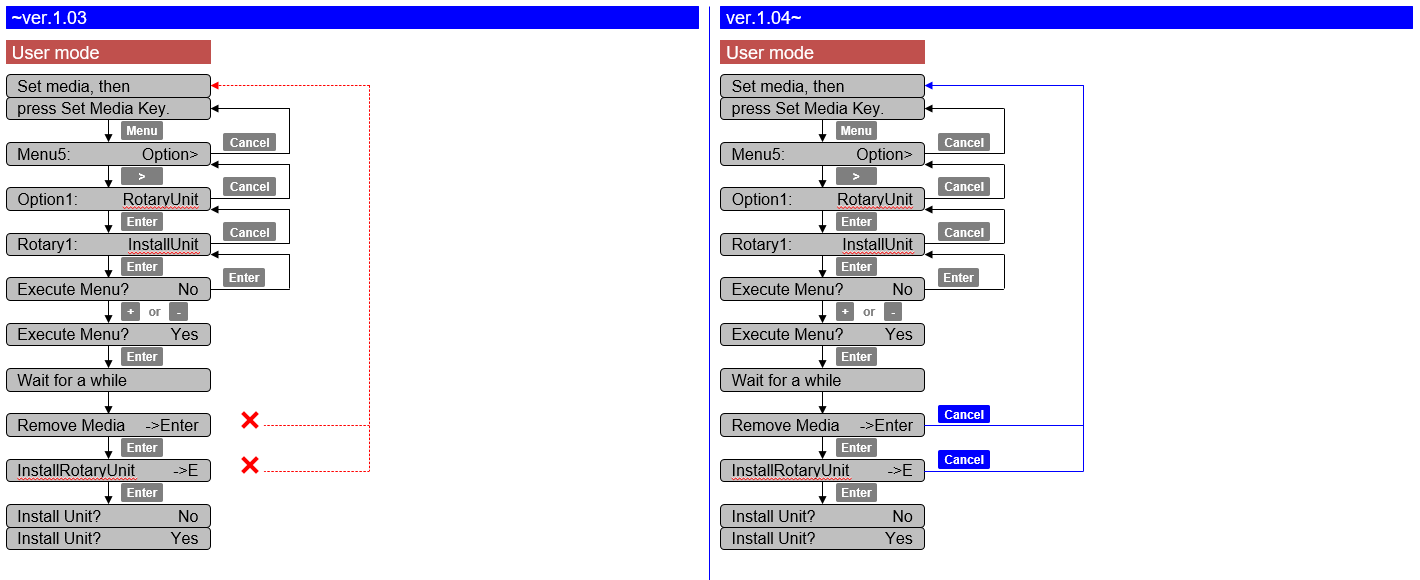
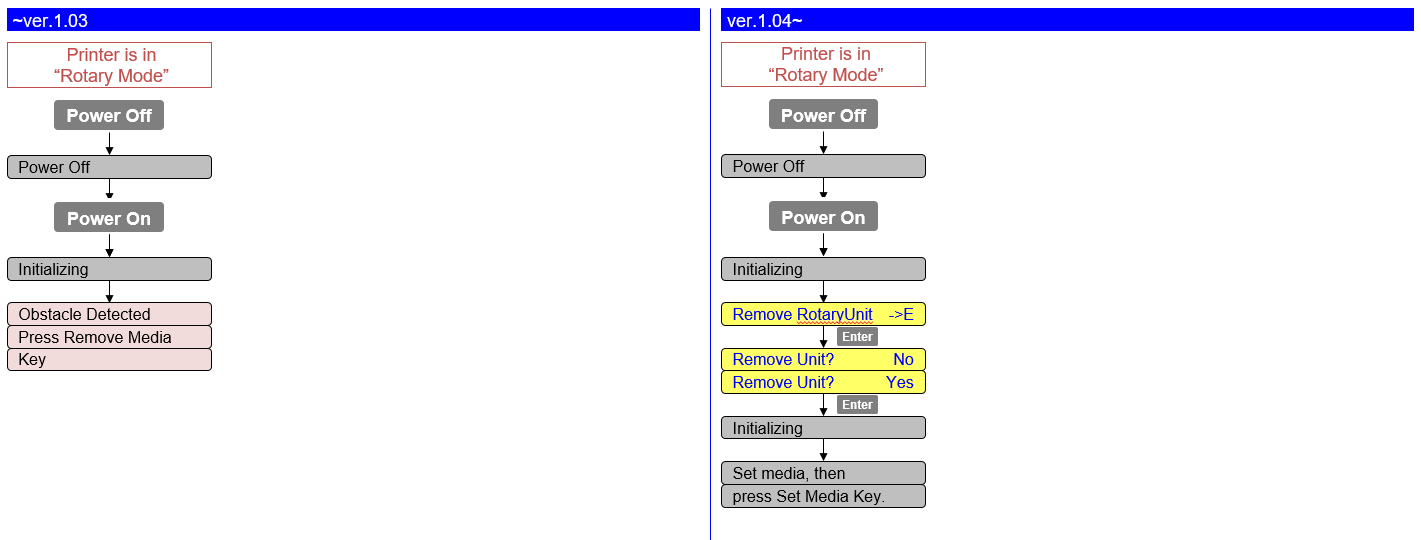
Changed the power-on sequence in Rotary Mode [User mode (Rotary Mode)]
If turning off and then turning on in Rotary Mode, the message appears to prompt users to remove the rotary unit.
Added the confirmation message to the user type setting [User mode (Rotary Mode)]
If a user type has not been set, the message appears on the operation panel to confirm the media height.
Improved the nozzle check printing function [User mode (Rotary Mode)]
The nozzle check pattern can be printed twice for a media.
Bug corrections
- Corrected the F/W bug that the parameter in MSA cannot be sent to a printer
If the communication between MSA and the main board is cut off, MSA will automatically retry to sent the parameter.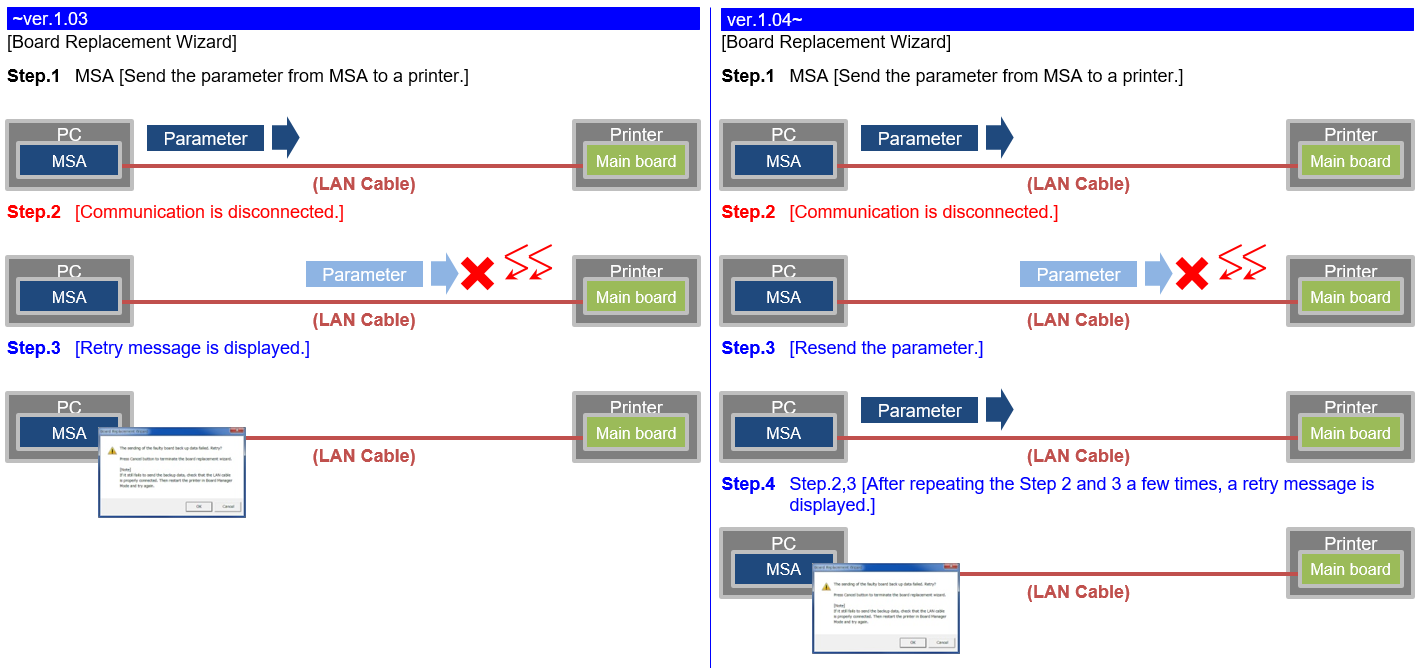
Release date: 26 april 2018
1.03
New Items
- Mutoh Rotary Unit
This firmware support the new rotary optionImportant - In order to work with the Mutoh rotary unit, you will need to upgrade the ValueJet Layer editor to the latest version, and you will need the Layout and print tool 2. Both can be found on the Mutoh FTP site.

- Changed the frequenty of the "lifetime" alert message
Persistent lifetime alert messages can now be deleted with the "cancel" key (User Mode)
7 days after pressing the "cancel" key, the message will reappear and you just have to hit the "cancel" button again - Parameter update after initial ink-charge
Previously the printer always needed a reboot after ink-charge, in order to properly store the charge-flag in the parameters. When an error occurred after sleep mode, the charge-flag was reset and inks needed to be recharged again if the printer was not properly restarted. From this version, parameters are now properly stored after initial charge without the necessity to reboot. - Added the alert buzzer menu
If the alert buzzer is set to off, the beep sound will turn off automatically after several beeps - Initial start-up sequence has been changed
When starting a new machine, during the start-up sequence, the firmware will now ask confirmation if the wiper has been installed Added extra menu items in Diagnostics
Data Width, Data Length, Table Height and RotaryUnit have been added in the menu.


Release date: 16 august 2017
1.02
New items
- Display the message to prompt users to perform the daily maintenance: when the total printing time reaches 12 hours, the message appears to prompt users to perform the daily maintenance

Changed items
- Additional *WL commands added
- wl22: white/varnish underlay KCMYV-on-WWV
- wl23: white/varnish overlay WWV-on-KCMYV
- wl24: 3 layer WWV-KCMY-V

Was this article helpful?
That’s Great!
Thank you for your feedback
Sorry! We couldn't be helpful
Thank you for your feedback
Feedback sent
We appreciate your effort and will try to fix the article