Under certain conditions it might be possible that UV print heads start suffering from ink drops on the nozzle plate. This can be related to not properly shaking of the cartridges/bags, the room conditions, a damper problem, poor maintenance of the machine....
This is an example of a leaking head on a UV printer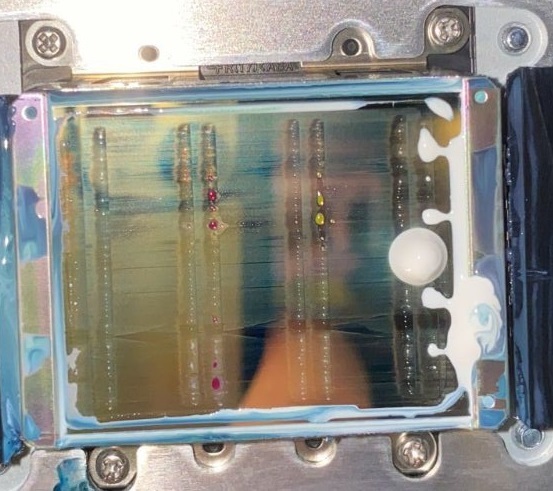 |
From experience we know that the US11 inks are more sensitive to this kind of phenomena under high room temperatures. The room temperature must be kept below 26 degrees and the humidity needs to be between 40% and 60%, so it is very important to work in the correct room conditions.
If the room conditions are respected then the problem could be related to the following:
- Problem with the coating layer of the head assy.
- Problem with the dampers.
- Not properly shaking of the cartridges/bags.
The coating layer of the head can be tested with the following procedure:
To be able to test the coating layer of the head you will need a polyknit wiper and UV cleaning. Put the polyknit wiper in the cleaning and dab it against the nozzle plate of the head for a few seconds. Observe the behavior of the cleaning on the nozzle plate.
| Note: It is very important to use a polyknit wiper and UV cleaning to test the coating layer of the print head. We recommend to dab the polyknit wiper against the nozzle plate and not to wipe it. If you would wipe the polyknit wiper over the nozzle plate of the head then there is a big risk of wiping the dirt of the print head into the nozzles which could result in head failure. |
Situation A:
If the cleaning solution is not moving towards the edge of the nozzle plate then the coating layer of the print head is damaged or very dirty. We advise to repeat this test a few times (up to 6x), every time with a new polyknit wiper. If it doesn't improve after repeating this procedure a few times it means there is a problem with the coating layer of the print head. In this case the head will need to be replaced.
Situation B:
If the cleaning is moving towards the edge of the nozzle plate then there is no problem with the coating layer of the head. In this case you will need to install 4 new dampers.
| Note: New dampers always need to be cleaned with the correct cleaning solution. In this case it is very important that the damper is cleaned with the correct UV cleaning and not with the maintenance cleaning (VJ-ULVA1-ML500). Please refer to the following article (Ink Shelf life, SDS & cleaning) to find a complete overview of the compatibility between the offered cleaning liquids and ink kinds. |
When replacing the damper we recommend to be very careful. If ink accidentally drops on contacts of a flat cable or on the electronics of the print head you will experience a lot of other electronical issues !
Printers without subtanks are more sensitive to dripping of ink when disconnecting the ink tubes because the needles are not sealed. We also don't recommend to use a clamp to pinch the tubes to prevent the inks to leak because this could damage the tubes.
An alternative and very useful tool is the DG-46926 - Jig Cartridge Assy (see tooling list). By using this tool the cartridge needles are sealed and no ink can leak out of the system.
In case the problem is solved by replacing the dampers then it is advised to check if the cartridges/bags are agitated properly. If not done frequently or done in an incorrect manner then ink sedimentation might occur, resulting in a blocked valve damper. A damper in which the valve is not closing accurately starts to leak and as such creates drops on the nozzle plate.
| Note: The following link contains the only correct way to agitate the cartridges How to properly agitate UV ink |
Was this article helpful?
That’s Great!
Thank you for your feedback
Sorry! We couldn't be helpful
Thank you for your feedback
Feedback sent
We appreciate your effort and will try to fix the article