Necessary tools
In order to be able to install firmware, the following tools are required:
- Personal computer with MS Windows
- Network cable to connect the Valuejet wit the pc
- The latest MSA-tool (Mutoh Service Assistance)
- Make sure the latest heater firmware is up-to-date and installed first, before installing the mainboard-firmware
Detailed instructions how to install the firmware, are described in the maintenance manual.
The latest current firmware can be downloaded below this article.
Release date: 21 january 2020
Current version 3.04
New items
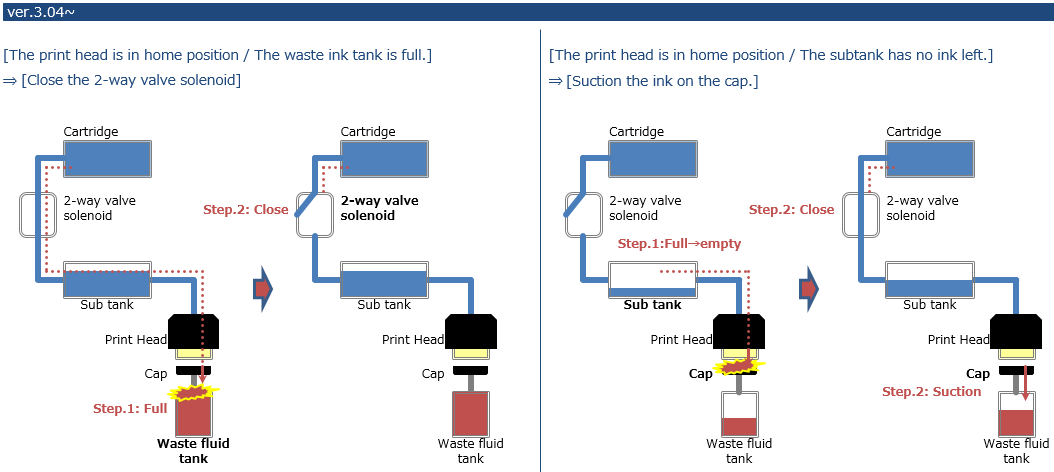
Prevent ink leakage during standby mode
- When the waste ink bottle is full, the 2-way solenoid valve closes
- When the subtank sensor detects there is no ink inside the subtank, it will refill it through the ink pump, sucking ink
Prints additional printer information on each nozzle check pattern (user mode):

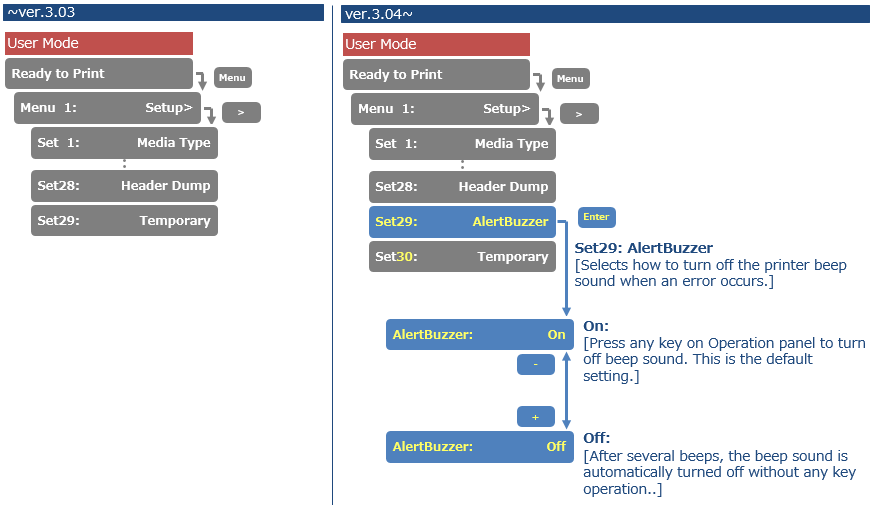
Added Alert Buzzer menu. If the Alert Buzzer is set to "Off", the beep sound will turn off automatically after several beeps
Bugfixes
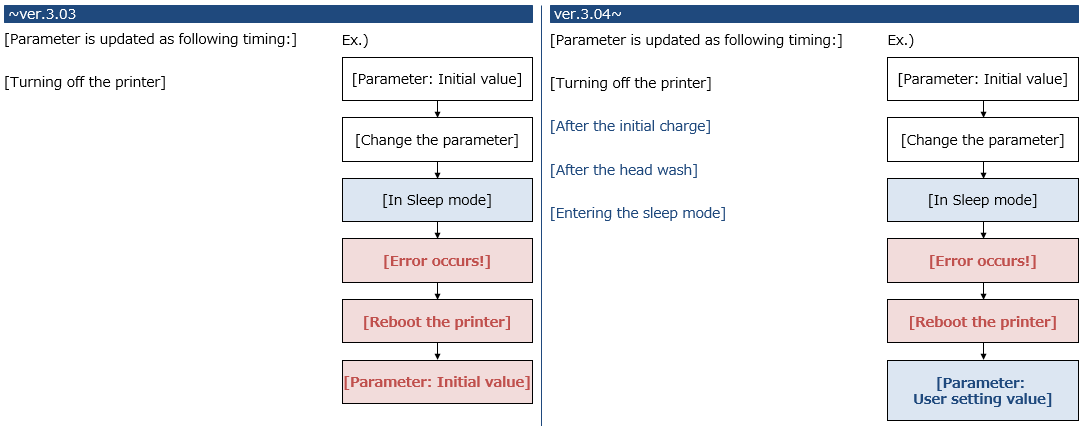
Parameters were not saved immediately after change (and not power cthe printer). When the printer goes to sleep mode (and in case an error occurs) the changed setting was lost. This has now been fixed in the following circumstances: Parameter is always saved immediately:
- After initial charge
- After a head wash
- When entering sleep mode
Version history
Release date: 3 august 2016
3.03
New items
- Drop master implementation: added the “thickness” menu to “setup” menu The printer now also accepts a Media Thickness command (*PK), making it possible to assign a media thickness value from the RIP per substrate type. Doing so will make sure that the bidirectional dot firing will be adjusted to the drop throw distance between the nozzle plate and the media surface. The result: prevention of print artefacts such as image fuzziness or image grain. The print quality will be easily reproducible, on condition that each media thickness is properly defined. It is advised to perform the uni/bi adjustment corresponding to the media thickness parameter set in diagnostics mode.
- Added the “Start Feed” menu: When Start Feed is set, before printing, the printer rewinds or feeds the media the amount specified by the set value
- Added the “Page Gap” menu to “Take-up” menu, in the Page Gap menu, you can change the
margin setting between images- Page gap = normal --> gap is approx. 60 mm
- Page gap = narrow --> gap is 10 mm
Added the notification menu about the remaining roll media status
Added “fine&fog1” and “fine&fog2” to “effect” menu
Added “header dump” menu to “setup” menu


Diagnostics mode
- Updated the maintenance menu structure
- Integrated the average jetting number menu
- Added the menu to check the ink consumption amount
- Added the head replacement menu: automatically initializing the counter after head rank input


Release date: 4 april 2016
3.02
Changed items
- Improved media initial procedure (to avoid CR2 over current)
Release date: 11 january 2016
3.01
- Modified the description of error messages
- "E075:Head Cable" ► "E-75:Head Temp",
- "E079:Commu." ► "E-79:Board Commu."
- User mode: maximum value of roll length changed from 99m to 200m
- New *PQ command added: Banner 7
PQ20; 360x1080dpi; 3pass; bidir; 320cps ; vsd1 - Maintenance mode 2: accumulated life-times added (cannot be initialized)
- User mode: tube flush operation added as part of CR maintenance procedure remark: also see tib nr. 572: TIB572_rev1.1_VJ-1x24 - VJ-1614_Adapted periodical maintenance using UMS ink and accompanying.pdf
- User mode: modified adjust print menu (new type of adjustment patterns)
Release date: 10 march 2014
2.02
Changed items
An old series of main boards are reaching the end of the production life time.
To make sure the new main boards will properly work in the ValueJet 1604, this new firmware has been made available.
As soon as the new main board series become available, a dedicated Technical Information Bulletin will be sent.
There is no need to update printers in the field. Just make sure to use at least this firmware or higher, when the new mainboard is introduced.
Release date: 30 october 2013
2.01
Changed items
Modified smart/chip ink capacity limit (It's possible to use up to 1000ml).
Info
RJ80EMS-100-xx inks contain 3 x 440 ml smart chip cards. In case you want to use the 1000 ml smart chips, please order VJ-LSINK1-xx1L inks.
| Important Please be aware that this new firmware needs to be installed in order to be able to use this new ink capacity limit. |
Release date: 8 june 2012
2.00
Changed items
- New revision of main board. Part number of the mainboard remains the same. The new mainboard will be used as from Q4 2012 because of flash memory component end-of-life. More info to follow a separate Technical information bulletin.
Release date: 7 oct 2010
1.19
New features
- New print modes
Added 8 new print modes (Q1, Q2, G1, G2, B1, B2 and 540x1440-12pass Uni-D/Bi-D)
Changed features
- EF command extended
EF command extended with 2 new effects (Fine&Fuzz3 and 4)
- PA command
Added *Pa command
- PS command
With ID*250, *PS command enables
Bug fixes
- Media feed
Media feeding fine adjustment => corrected
- Narrow width media
When loading a narrow width media, and the panel setting is set to Media Flush ON, the print margin at the left side (not-origin side) was bigger. This problem is now fixed.
- Bi-D adjustment print
After printing a Bi-D adjustment pattern, it kept on feeding media. This problem is now solved. - Aging CR motor
In diagnostic mode, after nozzle check, when executing Aging CR motor, unexpected media feed happens. This problem is now fixed. - Media detection error
During the media detection error, CR maintenance problem. When it gives the media detection error and executes Panel menu: CR maintenance, the carriage moves to the maintenance position and without having wait for ENTER key input, it immediately caps in. => fixed - Media initializing
In diagnostic mode, during the media initializing, when selecting "cleaning menu", the machine freezes. This problem is now solved. - Corrected text
Pnmp => Pump
- Setting the Take-up
When the take-up system is set to "enabled", and a Bi-D pattern is printed, it feeds media. This has been changed to: When setting the take-up system to “enabled” and a Bi-D pattern is printed, it doesn’t feed any media.
- Head temperature
Improved monitoring of the head temperature.
- Disabled ENTER key
Under the following conditions, pushing cleaning button - Enter 2 seconds - doesn't start the cleaning sequence. (after this, Enter doesn't work)- During the mechanical initializing
- During the media initializing
- During "cover open"
- During "lever up"
When this happens, press Enter for 2 seconds to disable the cleaning.
- Waste tank full
Improved “Waste tank full” sequence. When the machine displays "waste tank full / ink end" during cleaning, CR is left out as "cap-out" status.
- Before the suction/ power flushing, if the error is already appeared, it will wait until all errors are cleared.
- During suction when the waste tank full / ink end occurs, it will do the air suction and wait as "cap-in" status until error is cleared.
- Malfunctioning keys
When the front cover is open/close and you "restart" the printer and the maintenance cover R is still opens/closes, the panel message remains "Maintenance cover R is open". No panel key works. This problem is now fixed.
Release date: 20 march 2010
1.18
Changed items in diagnostics
- BiDir adjustment
- The default values of the bi-dir adjustment are changed.
- Parameter ALL printout showed wrongly marked defaults. This problem is now fixed.
Bug fixes
- During the initial ink fill cycle the printer displays the “re-cleaning” request, if all cleaning cassettes are now inserted, and you press the “ENTER” key, the message remains as if the printer is frozen. This problem is now fixed.
- A CPU error could occur during long duration prints or when performing a life check. This problem is now fixed.
- In a combination of front cover and side cover open/closed, the printer might get locked up. This problem is now fixed.
Release date: 17 december 2009
1.17
Changed items FW 1.14 ==> FW 1.15
- Limit of firing wave form voltage
The limit of firing wave form voltage is not implemented in some places. This is now added with this new firmware.
- CPU error
This new firmware avoids getting a CPU error when lowering the DIMM specification. - Cover open
When the cover is open just after media detection or CR maintenance, the unit gives CR over current error. This problem is now fixed.
Changed items FW 1.15 ==> FW 1.16
- Bi-D adjustment pattern
The after printing procedure when printing a Bi-D adjustment pattern in the user mode is changed to feed media so that it is easy to check the pattern.
Changed items FW 1.16 ==> 1.17
- Head lock release sequence
The head lock release sequence has been improved with this new firmware.
Changed items in diagnostics mode FW 1.15 ==> FW 1.16
- Changed speed mode
The speed mode is switched over to 320 cps / 400 cps by executing Maintenance mode 2 ==> Initialization ==> Default for shipping. When NVRAM is cleared, the machine switches back to 240/320 cps. In other words, when using the high speed mode the settings should be changed.
Bug fixes FW 1.14 ==> FW 1.17
- Media detection problem
When the cover is opened during printing, and putting the lever up / down during the recovery, a media detection problem occurred. This problem is now fixed. - Cleaning cycle
When the printer displays a “re-cleaning” request, all cleaning cassettes are inserted and pressing the “Enter” Key, the message remains the same as if the machine is frozen. This problem is now fixed. - Abnormal firing during printing
While printing, the printer switches wave forms before the wave is properly finished. - Autocleaning
In the menu “Selection”, the autocleaning was not always available. This problem is now fixed. - CPU error
Sporadically, a CPU error was generated. This problem is now fixed. - Head lock release problem
When performing a CR maintenance in combination with CANCEL, a head lock release problem could occur. This problem is now fixed.
Release date: 12 june 2009
1.14
Changed items
- Head lock solenoid duty
The head lock solenoid duty is changed. - Changed English messages
Changed the english message [HeadWash] to [Longstore]. - Cleaning during printing
When performing a cleaning during printing, some nozzles could get lost. Therefor the print head will now cap-in before performing a cleaning. - Air suction sequence
Reviewed the regular air suction sequence. - Ink overflow
There was the possibility that ink could overflow from the capping. Therefor the sequence changed to wait for a certain period before starting the suction. - Head wash
The head wash procedure will now only work with the cleaning cartridges. - Changed head temperature
Changed the head temperature monitor limit from 40C to 85C - CR2 over current
Changed CR2 over current threshold value at the acceleration. - Transportation mode
Remove the function of "transportation mode" since it's not necessary.
Changed items in diagnostics mode
- Added heater flag
Added the heater flag in Update-Diagnostic so that it is possible to set "heater off". - Dot print pattern
Changed the dot print pattern in diagnostic. - Pre-heater On
The pre-heater will be switched on at the platen adjustment in diagnostic. - Heater check specifications
Some part of the heater check specification in diagnostics changed.
Bug fixes
- Diagnostic initialization
Bug fixed for the problem just after executing diagnostic initialization. - Head lock failure
When capping in manually in CR maintenance, the Head lock release fails which gives "over current" problem. This problem is now fixed. - Direct cleaning key
The direct cleaning key sometimes did not work. This problem is now fixed. - Main suction position
The main suction position is shifted by opening/closing the cover during head wash. This problem is now fixed. - Pump motor life span counter
Pump motor life span count was not counted. This problem is now fixed. - Set-up All list
When printing out the set-up list ALL, it used to print "idle heater: OFF". This problem is now fixed. - H_CONT FW Mis-install
H_CONT FW Mis-install was not functional. This problem is now fixed. - CPU
CPU occurs when using the old PM command. This problem is now fixed. - CPU error
Repeating executing the cleaning cycle gives CPU error => fixed - PF position
When the printer is set to Origin, it did not take PF position into account. This problem is now fixed. - Cleaning sequence
The printer keeps repeating the cleaning sequence when pressing on the panel longer than 4 seconds. This problem is now fixed. - Waveform
When working under the minimum environmental temperature (less than 20C), the waveform might not be firing correctly. This problem is now solved. - Power black out
When a power black out occurs, the internal sequence was not working properly. This problem is now fixed. - Network problem
Due to the network problem, it gives E016AddErr-L/I(04) error. this problem is now fixed. - Pump counter
In the lift time menu, the pump count does not decrease. This problem is now fixed. - BI-D adjustment
In Bi-D adjustment in diagnostic mode, the carriage stops at the non-origin (the left) side. This problem is now fixed. - CPU error
When executing "little charge" (except the sub tank filling) in diagnostic mode, and opening the cover, it gives a CPU error. This problem is now fixed. - Sub tank low sensor error
When performing a cleaning during sleep mode, a sub tank Low sensor error occurred. This problem is now fixed. - CPU error countermeasure
Countermeasure for CPU error when printing larger than 1200mm width in Quality2. - Print data position
Fixed the problem of the print data position is shifted - CR2 error countermeasure
Countermeasure for the CR2 error when the head lock is released and the cover is open/close. - CPU error
Against the irregular CPU error (TLB errors etc) problem, changed "SDRAM".
Release date: 11 september 2008
1.13
- "Effect mode"
In the "Effect mode" the following settings have a changed name- Fine&Wave3 changed into Fine&Fuzz1
- Fine&Wave4 changed into Fine&Fuzz2
There are also two new features added:- WOW1
- WOW2
The effect menu is now as follows:

- Modified auto cleaning sequence
New implementation ==> Set16: Auto cleaning
| Parameter | Range | Function |
| Waiting time (cleaning during standby) | 0...360...1440 min | 0: no auto cleaning done<Value>: when <value> passed, the cleaning cycle selected in panel is done |
| Printing time (cleaning during printing) | 0...5...180 min | 0: no auto cleaning done <Value>: when <Value> passed, the cleaning cycle selected in the panel is done. |
| before print | [OFF] / [ON] | ON: cleaning cycle selected in panel is done before printing starts |
- Modified "Media flush" setting range
New implementation ==> Set 3: Flushing
If the parameter is set to “on media”, a returncount parameter sets the frequency of returning to the flushing box during printing.
| Parameter | Range | Function |
| Returncount | -999 ... 5 ... 999 | -1: returns to flushing box every print head movement, no flushing on media. 0: No flushing done during printing 5: returns to flushing box every 5 print head movements, flushing on media. |
- Banner 4 mode
In banner 4 mode, variable dot is supported.
Changed features from Firmware 1.12 ==> 1.13
- Subtank sensor
In case the subtank sensor Low detects OFF and the subtank sensor High detects ON, a system fail error will occur. This because it is an abnormal situation. - Cover open / close
In case the head is shifted manually after opening the cover, the head would go back to the original position after closing the cover. When opening the cover again, the machine does not recognize that the cover is open, so that the head continues to move. This problem is now solved. - Roll end
The roll end was not detected at the feed processing of the media detection. This is now corrected. - Subtank sensor
During printing it was possible to print until the ink goes lower than the sub tank “Low” sensor. This is now corrected. - Lever up
When the lever is up, no more CR lock release is possible. - Two P Valve
2P Valve control sequence is optimized. - Network error
During printing a fatal lock up situation could occur between the network card in the workstation and the printer. This problem is now solved.
Release date: 14 november 2007
1.11
Changed items FW 1.08 ==>1.10
- Improved temperature compensation for consistent colour output. The new compensation method is default enabled. The new temperature compensation may mildly influence the colour behaviour. To keep the existing
colour behaviour, although it is less consistent, please set the “Debug bit” in diagnostic mode.
1. Diagnostic mode -> Parameter -> Update -> Debug bit
2. Change the value of the fourth digit from right to [1]
3. Change the value of the seventh digit from right to [1]. - “Banner 1” and “Banner 2” can now be used both as fixed dot and variable dot mode.
- Cleaning before printing changed
For a certain time when the cap is open before printing, the printer judges whether the cleaning or the flushing would be executed. In case of the nozzle check in User menu, the printer would not execute the cleaning forcefully, but
the flushing would be executed. - Overlap problem corrected
When printing variable dot data (except NONE), the overlap dot shape and dot amount changed. This problem is corrected. - When selecting setup list print or setup list print ALL, and press Menu, the printer reprints. => corrected.
Problem description:
It should be only once the printer ouputs “setup list”. The printer used to print twice. When you select either “setup list” or setup list all and then press the menu key, The printer prints twice. The bug is fixed. - The printer’s selection menu allows hiding setup items that are not frequently used. This feature did not always function properly. This bug is fixed.
- Maximum print length changed from 33 m to 200 m (RTL-PASS data 1 file maximum print length)
- In previous firmware, the printer would perform a media feed equal to the Y-axis origin setting after finishing a job or printing a set-up list. This is now corrected.
Changed items FW 1.10 ==> 1.11
The main purpose of this FW version-up is for adding “Sleep mode” and the countermeasure for CR2 over current.
Changed items are as follows:
- Added sleep mode. When you activate sleep mode, the printer operates as follows.
- The exhaust fan stops.
- The paper-lifting fan stops.
- All heaters stop.
- All lamps switch OFF except for the power lamp.
- Automatic head cleaning is performed after the time set in the “Timer setting” menu has expired.
- CR2 over current error detection was changed. During carriage movement, the printer monitors over current. In previous firmware, conditions occurred when the error occurred to soon. Status: Solved.
- When a severe error such as CR (PF) motor, CR (PF) timeout, CR (PF) over current or CR2 (PF2) over current error, the printer waits for the lever-up sequence.
- When selecting Diagnostic/Adjust/Send pitch 720 (print) or 1440 (print), it does not print normally. Since this is not used, this function is deleted.
Release date: 15 may 2007
1.08
Changed items
- Added new wave: Fuzz
Fuzz1/Fuzz2 are added instead of Wave3/Wave4; this waveform gives a fuzzy joint between consecutive print passes improving overall print quality. An example can be found in the picture below

Added “Pause” function during printing
By pressing the [-] key during printing, the operation is paused, pressing [enter] resumes the printing operation.Corrected idle heating problem
The internal timer of the idle heater was activated even if the “idle heater was OFF”.Delete the waste count.
The VJ1604 is foreseen from a sensor which checks the waste ink. The waste ink is counted internally, but because it is not possible to clear the internal counter in normal mode, the counter would not be backed-up.
Was this article helpful?
That’s Great!
Thank you for your feedback
Sorry! We couldn't be helpful
Thank you for your feedback
Feedback sent
We appreciate your effort and will try to fix the article