Necessary tools
In order to be able to install firmware, the following tools are required:
- Personal computer with MS Windows
- Network cable to connect the Valuejet wit the pc
- The latest MSA-tool (Mutoh Service Assistance)
- Make sure the latest heater firmware is up-to-date and installed first, before installing the mainboard-firmware
Detailed instructions how to install the firmware, are described in the maintenance manual.
The latest current firmware can be downloaded below this article.
Release date: 21 january 2020
Current version 3.04
New items
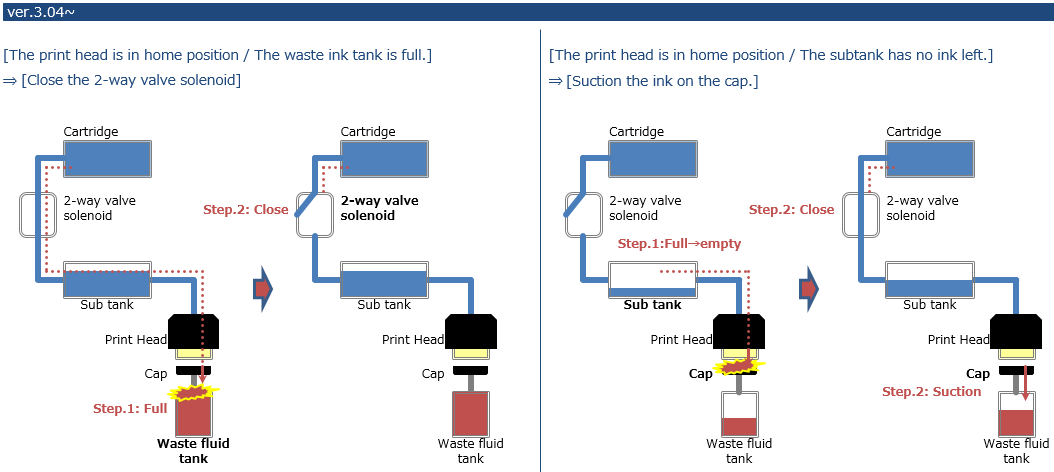
Prevent ink leakage during standby mode
- When the waste ink bottle is full, the 2-way solenoid valve closes
- When the subtank sensor detects there is no ink inside the subtank, it will refill it through the ink pump, sucking ink
Prints additional printer information on each nozzle check pattern (user mode):

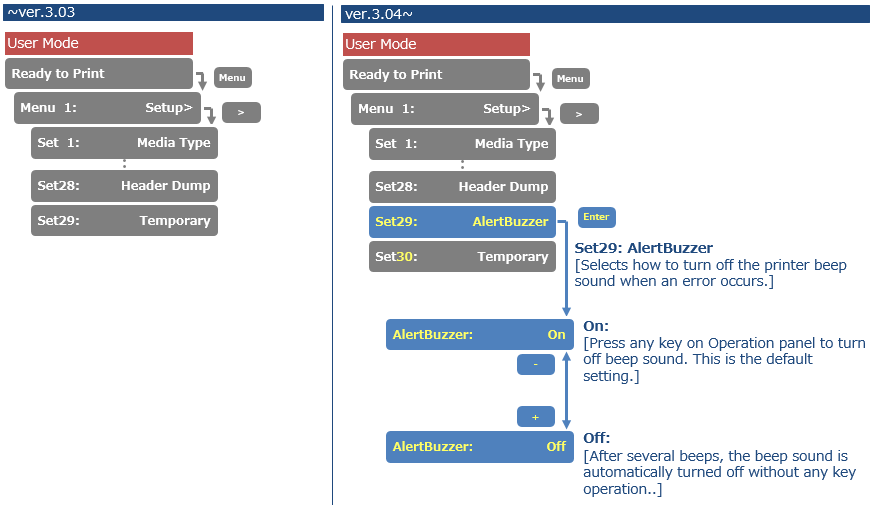
Added Alert Buzzer menu. If the Alert Buzzer is set to "Off", the beep sound will turn off automatically after several beeps
Changed items
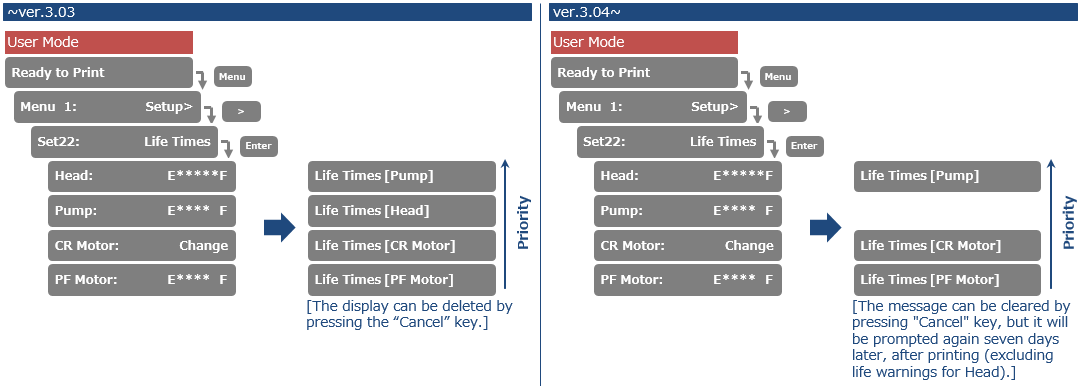
Changed the frequency of the lifetime alert message. If 7 days have passed after pressing the "cancel" key, the alert message will reappear when you print. Lifetime alerts can easily be cleared from the display, when pressing the "Cancel" button.
Version history
Release date: 3 august 2016
3.03
New items
- Drop master implementation: added the “thickness” menu to “setup” menu The printer now also accepts a Media Thickness command (*PK), making it possible to assign a media thickness value from the RIP per substrate type. Doing so will make sure that the bidirectional dot firing will be adjusted to the drop throw distance between the nozzle plate and the media surface. The result: prevention of print artefacts such as image fuzziness or image grain. The print quality will be easily reproducible, on condition that each media thickness is properly defined. It is advised to perform the uni/bi adjustment corresponding to the media thickness parameter set in diagnostics mode.
- Added the “Start Feed” menu: When Start Feed is set, before printing, the printer rewinds or feeds the media the amount specified by the set value
- Added the “Page Gap” menu to “Take-up” menu, in the Page Gap menu, you can change the
margin setting between images- Page gap = normal --> gap is approx. 60 mm
- Page gap = narrow --> gap is 10 mm
Added the notification menu about the remaining roll media status
Added “fine&fog1” and “fine&fog2” to “effect” menu
Added “header dump” menu to “setup” menu


Release date: 4 april 2016
3.02
Changed items
- Improved media initial procedure (to avoid CR2 over current)
Release date: 11 january 2016
3.01
New items
- Modified the description of error messages
- “E075:Head Cable” ► “E-75:Head Temp”
- “E079:Commu.“ ► “E-79:Board Commu.”
- User mode: maximum value of roll length changed from 99m to 200m
- Maintenance mode 2: accumulated life-times added (cannot be initialized)
- User mode: modified adjust print menu (new type of adjustment patterns)
Release date: 25 february 2015
2.02
New items
- New print mode: *PQ14; banner 7; 540 x 360 dpi, 3 pass, bidir
- New print mode: *PQ15; banner 8; 360 x 1080 dpi, 3 pass, bidir
New items in Diagnostics mode
- Diagnostic menu: New speed setting in speed mode menu (check 12)
- speed mode 1: high 320 cps / 400 cps
- speed mode 2: normal 240 cps / 320 cps
- speed mode 3: super high 320 cps / 460 cps
- Diagnostic mode: added the accumulated life time values in the record menu (cannot be initialized)
Release date: 10 march 2014
2.01
Changed items
The current main boards are reaching the end of the production life time. To make sure the new main boards will properly work in the Valuejet 1604W, a new firmware has been made available.
As soon as the new main boards become available, a dedicated Technical Information Bulletin will be sent to inform you. At this time there is no need to update printers in the field. Just make sure to use this firmware when the new mainboard is introduced.
Release date: 11 june 2012
2.00
Changed items
- New revision of main board. Part number of the mainboard remains the same. The new mainboard will be used as from Q4 2012 because of flash memory component end-of-life. More info to follow in another bulletin.
Release date: 9 november 2010
1.08
Changed features
- Expanded the *EF PM command (Fine& Fuzz 3 and 4)
- Added the * PA PM command
- *PS will become valid with the PM command *ID250
- Bi-D initial value changed
Changed features in diagnostics
- In diagnostic mode, after nozzle check, when executing Aging CR motor, unexpected media feed happens. This problem is now fixed.
- In diagnostic mode, during the media initializing, when selecting the “cleaning menu”, the machine freezes. This problem is now fixed.
Bug fixes
- Fixed memory leak while checking the life
- Even after changing the head rank value, the original default had still the “*” mark. => fixed
- Manual feed problem => fixed
- It used to occur that the panel keys did not work when opening / closing the front cover and the right maintenances cover. This problem is now fixed.
- When loading a narrow width media, and the panel setting is Flushing: Media Flush ON, the print margin at the left side (not-origin side) is bigger. => fixed
- After performing a Bi-D adjustment pattern print, it doesn't stop media feed. This problem is now fixed.
- When it gives the media detection error and executes Panel menu: CR maintenance, the carriage moves to the maintenance position and without waiting for ENTER key input, it immediately caps in. => fixed
- When the take-up system is set to “enabled”, and a Bi-D pattern is printed, it feeds media. This has been changed to: When setting the take-up system to “enabled” and a Bi-D pattern is printed, it doesn’t feed any media.
- Improved “Waste tank full” sequence. When the machine displays “waste tank full / ink end” during cleaning, CR is left out as “cap-out” status.
- Before the suction/ power flushing, if the error is already appeared, it will wait until all errors are cleared.
- During suction when the waste tank full / ink end occurs, it will do the air suction and wait as “cap-in” status until error is cleared.
- Under the following conditions, pushing cleaning button - Enter 2 seconds - doesn't start the cleaning sequence. (after this, Enter doesn't work)
- During the mechanical initializing
- During the media initializing
- During “cover open”
- During “lever up”
When this happens, press Enter for 2 seconds to disable the cleaning.
- When loading A4 (about 210mm) in lengthwise and executing a nozzle check, it gives a CPU error. This problem is now fixed.
- Media feeding fine adjustment => corrected
- On the origin setting value input screen (X: 00000mm Y: 0000mm), when the lever is UP/DOWN, problems occurred under the following 2 operations:
- When going back to the previous screen with the Cancel key, even during the media detection (no media loaded), the value can be input via panel.
Countermeasure The value can't be input. (message “Action invalid” appear) - When going back to the previous screen with the Enter key, the message “Position check => Enter” appears at CR cap-out position.
Countermeasure: Since there is no media loaded at the operation 2, the origin position check will not be performed.
- When going back to the previous screen with the Cancel key, even during the media detection (no media loaded), the value can be input via panel.
- Feeding media after Bi-D pattern in User menu, and a media end occurs, the manual feed was not possible.This problem is now fixed.
- When the origin setting (PF) is set to 15m and performing a position check, the feed direction becomes reversed. Even after feeding, the machine freezes. => after restart, it goes back to normal. If one feed distance is too big, the internal variable overflows. If one feed distance is more than 5m, a processing which will divide per 5m and feed per 5m.
Release date: 23 march 2010
1.07
Changed items FW 1.04 ==> FW 1.05
- 400cps
This new firmware now supports 400 cps. - Head lock solenoid duty
Changed the head lock solenoid duty. - Regular air suction sequence.
The regular air suction sequence has been reviewed. There was the possibility that ink overflow occurred from the capping. Therefore, the sequence changed to wait for a certain period, and then it starts suction. - Changed display text
Some English display message changed. - Head wash
The head wash operation will now only work with the cleaning cassettes. - Head temperature
Changed the head temperature monitor limit from 40°C to 85°C. - Transportation mode
Removed the function “Transportation mode” since it is not necessary. - Changed CR2 over current threshold
Changed CR2 over current threshold value at the acceleration.
Changed items FW 1.05 ==> FW 1.06
- Bi-D adjustment pattern
After printing a Bi-Dir adjustment pattern, the media is fed forward to make it easier to verify the pattern.
Changed items FW 1.06 ==> FW 1.07
- Head lock release sequence
The head lock release sequence has been improved.
Changed items in diagnostic mode FW 1.04 ==> FW 1.05
- Dot print pattern
Changed the dot print pattern in diagnostic mode.
Changed items in diagnostic mode FW 1.05 ==> FW 1.06
- Speed mode
Added a speed mode in the menu parameter All.(Diagnostics ==> Parameter ==> All). - Changed speed mode
The speed mode is switched over to 320 cps / 400 cps by executing Maintenance mode 2 ==> Initialization ==> Default for shipping.
When clearing the NVRAM, it switches back to 240/320 cps. In other words, when using the high speed mode the settings should be changed.
Bug fixes FW 1.04 ==> FW 1.05
- Power black out
If a power black out occurs, the internal sequence was not working properly. This problem is now fixed. - Executing diagnostic initialization.
Bug fixed for the problem just after executing diagnostic initialization. - Print data position
Fixed the problem of the shifted print data position. - Firing wave form width
We have added a limit to the firing wave form width since it could happen that if was out of specifications. - CPU error
- Countermeasure
Countermeasure for the CPU error when printing larger than 1200mm width in Quality2. - Old PM command
Using the old PM command gives a CPU error. This problem is now fixed. - Cleaning cycle
Repeating to execute the cleaning cycle gives a CPU error. This problem is now fixed. - Little charge in diagnostic mode
When opening the cover during a "little charge" (except during sub tank filling) in diagnostic mode, it gives a CPU error. This problem is now fixed. - Lowering DIMM specification
This new firmware makes sure the printer is not giving a CPU error if the DIMM specification is lowered.
- Countermeasure
- Head lock release
When manually pushing the carriage to the left side of the printer, the head lock would not get released. This problem is now fixed. - Print fine adjustment value
During printing, the print fine adjustment value was not stored properly. This problem is now fixed. - Pump counter
In the life time menu, the pump counter does not decrease. This problem is now fixed. - Network problem
Due to a network problem, the following error occurred E016AddErr-L/I(04). This problem is now fixed. - Origin
When the printer is set to Origin, it does not take PF position into account. This problem is now fixed. - Initialization of diagnostic parameter
After initialization of the diagnostic parameter, the printer becomes unstable. This problem is now fixed. - Pump motor life span
The pump motor life span count was not counted. This problem is now fixed. - Repeating cleaning sequence
Keep repeating the cleaning sequence when pressing on the panel longer than 4 seconds. This problem is now fixed. - Environmental temperature
If the environmental temperature becomes less than 20°C, the wave forms were not firing correctly. This problem is now fixed. - Cleaning key
The direct cleaning key sometimes did not work. This problem is now fixed. - Bi-D adjustment in diagnostic mode
When performing the Bi-D adjustment in diagnostic mode, the carriage stops at the non-origin (left) side. This problem is now fixed. - CR2 error
Countermeasure for CR2 error when the head lock is released and the cover is open/close. - 2P valve
When powering on the printer without performing an initial ink fill, the 2P valve used to start. This is changed, so the 2P valve will not start. - CR over current error
When the cover is open just after media detection or CR maintenance, it gives a CR over current error. This problem is now fixed.
Bug fixes FW 1.05 ==> FW 1.06
- Media detection problem
If opening the cover during printing, and putting the lever up / down during the recovery, a media detection problem occurred. This problem is now fixed. - Countermeasure
A countermeasure is made for the abnormal printing that could occur.
Bug fixes FW 1.06 ==> FW 1.07
- Ink end
Sporadically a warning (buzz) for INK end could fail. This problem is now fixed. - CPU error
Sporadically a CPU error could be generated. This problem is now fixed. - Head lock release problem
When performing a CR maintenance in combination with the “Cancel” key, a head lock release problem could occur. This problem is now fixed. - Autocleaning
In the “Selection” menu, the “autocleaning” was not always available. This problem is now fixed.
Was this article helpful?
That’s Great!
Thank you for your feedback
Sorry! We couldn't be helpful
Thank you for your feedback
Feedback sent
We appreciate your effort and will try to fix the article