General guidelines:
- Make sure all nozzles are present by performing a nozzle check at the end of the last working day.
- Perform a maintenance cleaning cycle to ensure no ink remainders are present.
- Clean around the head
- Clean the wiper
- Clean around the cap
- For printers with UMS/MS51: perform a tubing flush
- For UV LED:
- Clean the UV lamp
- Moisten the print head nozzle plate
- Remove the loaded material to avoid deformation (cockling) of the media.
- Make sure the print head is properly capped in after shutting down. Leaving the printer uncapped for a long time will result in nozzle drop-out and eventually in head damage.
- Empty the waste bottle and keep it installed. Removing the waste bottle may result in ink leakage.
- To avoid dust collection inside the printer, make sure to close all printer covers. It is recommended to cover the LED UV printers from the light to avoid spontaneous ink curing during the period of inactivity.
- Power Off / Sleep mode:
- Eco (MS41 included) and water-based (UV) printers can safely be powered off.
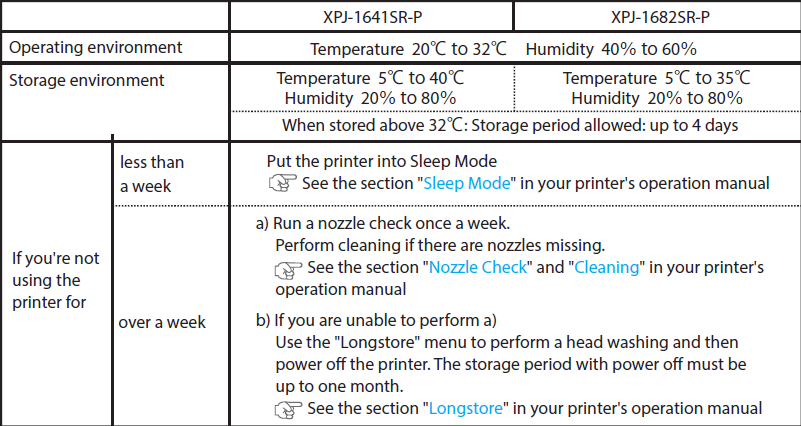
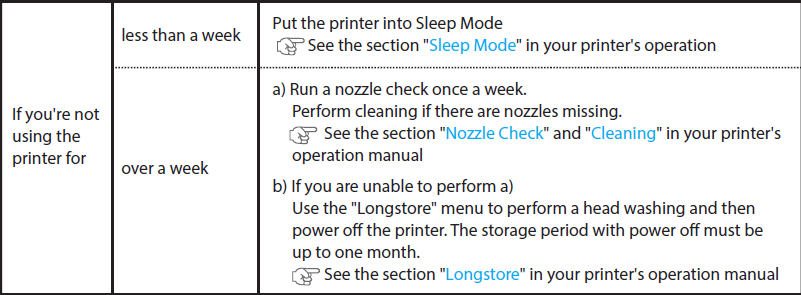
- For short periods of inactivity (less than 1 week) on MP31, UV or MS51 the printer can be put into sleep mode. As usual always follow the maintenance instructions and guidelines before putting the printer into sleep mode.
- If the period of inactivity on MP31, UV, UMS & MS51 printers is more than 1 week, please follow the guidelines below
MP31 inks
| Overview Daily Maintenance | |
In case the printer is not in use for 1 week or longer but it can be maintained every week, please perform this weekly maintenance | In case the printer is not run for 1 week or longer and it cannot be maintained every week (printer will be shut-down), please perform this maintenance |
|
|
UV inks
| Overview Daily Maintenance | |
In case the printer is not in use for 1 week or longer but it can be maintained every week please perform this weekly maintenance | In case the printer is not run for 1 week or longer and it cannot be maintained every week (printer will be shut-down), please perform this maintenance |
|
|
UMS inks
| Overview Daily Maintenance |
| In case the printer is not run for 1 week or longer, please perform this maintenance |
|
MS51 inks
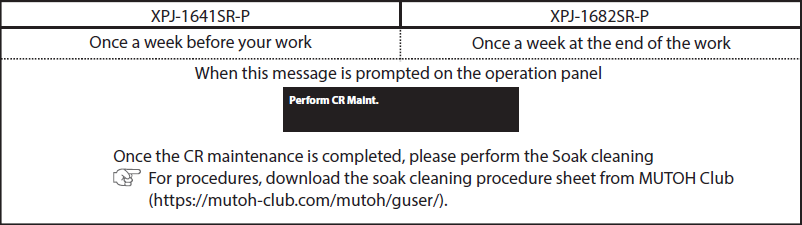
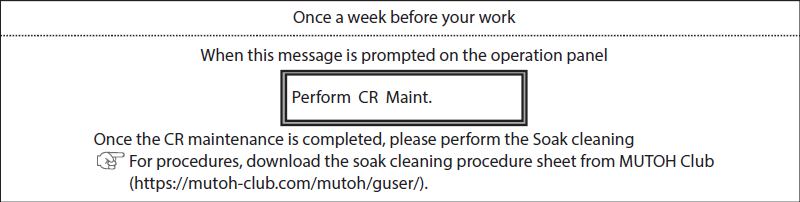
1/ XPJ-1641SR-P / XPJ-1682SR-P
When to perform maintenance:
Periods of inactivity:
When to perform maintenance:
Periods of inactivity:
Aquafuze inks (waterbased UV)
When the printer is not in use for 2 weeks or more a Longstore must be performed to avoid nozzle issues after the holidays.
For the correct workflow please consult the Operation manual page 179 and further.
Partnumber for cleaning bags: AQ-CL300 ==> 300 ml cleaning pack for initial start-up or washing
For shorter periods of inactivity the printer can be powered off.
Please be informed tha a Daily maintenance will need to be done during this cycle.
See Operation manual page 44.
Was this article helpful?
That’s Great!
Thank you for your feedback
Sorry! We couldn't be helpful
Thank you for your feedback
Feedback sent
We appreciate your effort and will try to fix the article