You can transfer a VerteLith license to another MUTOH Club account as long as the new account belongs to the same company. The MUTOH Club is structured so that a company can have multiple user accounts, and licenses can be managed between them within the same company entity.
How:
- Log in to MUTOH Club using the current user account (the one that is using the license).
- Navigate to Vertelith Info > License Management.
- Unpair (release) the license from its current association.
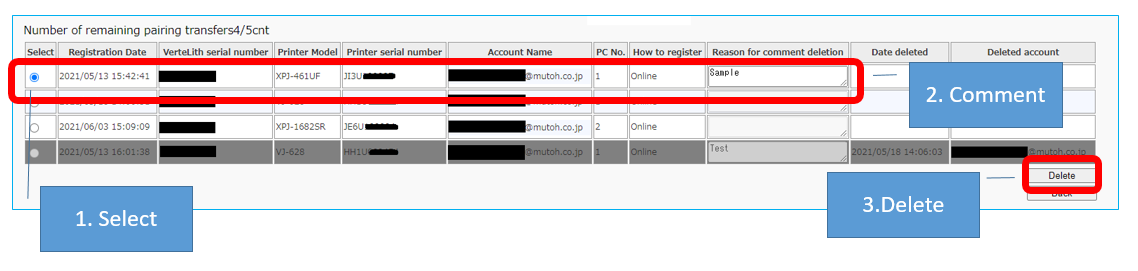
- Now there are 2 scenario's:
- Using the same PC:
- Uninstall VerteLith.
- Re-install VerteLith.
- use the license to add the printer in VerteLith using the new Mutoh Club account credentials.
- Using another PC:
- Uninstall VerteLith on the old PC.
- Install VerteLith on the new PC.
- use the license to add the printer in VerteLith using the new Mutoh Club account credentials.
- Using the same PC:
You have transferred the license to another Mutoh Club account / email-address.
Was this article helpful?
That’s Great!
Thank you for your feedback
Sorry! We couldn't be helpful
Thank you for your feedback
Feedback sent
We appreciate your effort and will try to fix the article