Dear Customer,
The PJ-2508UFE is equipped with 3 AC Servo drivers.
When installing new servo drivers they require a specific configuration. If such a driver is not configurated correctly and used in "default" settings the operation may not be correct and errors might occur.
Please use the dedicated tool and the described procedure to configure the settings.
The settings are different for X and Y so please set them correctly during installation.
Needed items:
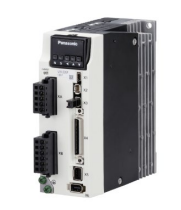
- New AC servo driver: DG-48822 :
- PC with USB port
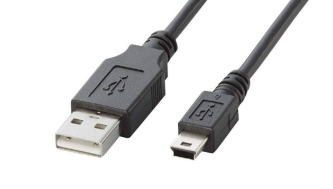
- USB cable (USB-A miniB)
- Setting tool: PANATHERM installer ==> Download Link: https://www.dropbox.com/scl/fi/oy174z5qyc7lupmb42fgf/PANATERM_installer_Ver6.zip?rlkey=igeww43mxupvk4dyon826mzb1&dl=0
- Setting file (X and Y): PJ-2508UFE servo parameters ==> Download link: https://www.dropbox.com/scl/fo/vwepwcexxu0any0iwu7nr/h?rlkey=58nuyk3cn34qo9jd377rdk9ep&dl=0
Procedure:
- Install the Setting tool on your PC
- Replace the AC servo driver in the printer
- Switch on the printer (press the green start button, no PJ software is required)
- Connect the AC servo driver and the PC with the USB cable
- Boot the tool (PANATHERM)
- Upload (trans.) the setting file to the Servo Drive
- Reboot the printer
- Procedure is completed
Please refer to the video for instructions on how to use the tool: https://www.youtube.com/watch?v=tvmQJKcJE04
Was this article helpful?
That’s Great!
Thank you for your feedback
Sorry! We couldn't be helpful
Thank you for your feedback
Feedback sent
We appreciate your effort and will try to fix the article